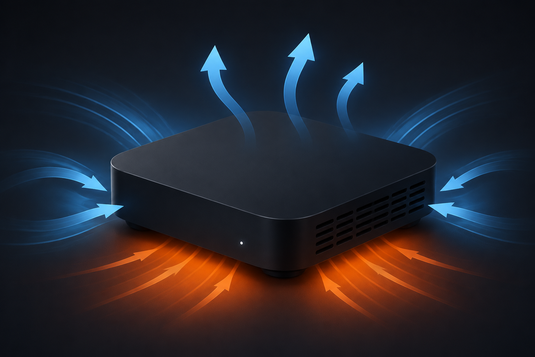
電視盒子發熱是否正常?/ Is a Warm TV Box Normal?
結論先行:電視盒子運作時發熱屬完全正常。內部處理器與影像解碼晶片運作時必然產生熱量,尤其在播放 4K 內容或長時間串流時。機身溫暖並不代表裝置有問題。
First, the short answer: it is completely normal for a TV box to feel warm during use. The processor and video decoding chip generate heat by design, especially during 4K playback or long streaming sessions. A warm casing is not by itself a sign of a fault.
真正需要注意的是過熱,即出現以下情況:
What genuinely warrants attention is overheating, which shows up as:
- 播放期間畫面突然停頓或裝置自動重啟 / Playback freezing or the device spontaneously rebooting
- 系統反應明顯變慢、遙控出現延遲 / Noticeably sluggish response and remote lag
- 機身燙手(並非僅為溫暖)/ The casing hot to the touch, not merely warm
- 無線網絡連線變得不穩定 / WiFi connection becoming unstable
常見過熱成因 / Common Causes of Overheating
一、擺放位置通風不足 / Poor Ventilation
此為最常見成因。不少用戶將裝置放置於電視櫃的密閉隔層內,或疊放於其他電器(如機頂盒、遊戲機、擴音機)之上。此類位置熱空氣難以散去,溫度會持續累積。
By far the most common cause. Many users tuck the box inside a closed TV cabinet compartment, or stack it on top of other electronics such as a set-top box, games console or amplifier. Hot air cannot escape and temperature builds steadily.
二、散熱孔受阻 / Blocked Vents
機身側面及底部的散熱孔積聚塵埃,或被布料、雜誌、擺設遮蔽,均會直接影響散熱效率。
Dust accumulating in the side and base vents — or the vents being covered by cloth, magazines or ornaments — directly reduces cooling efficiency.
三、環境溫度偏高 / High Ambient Temperature
夏季室溫可達三十餘度,若房間未開冷氣而又長時間播放,裝置的散熱空間將被大幅壓縮。
In warm weather, room temperature can exceed 30°C. Streaming for hours in an unconditioned room leaves the device far less thermal headroom.
四、長時間高負載運作 / Sustained Heavy Load
連續播放 4K 內容、長時間開機待機,或同時運行多個應用程式,均會令處理器持續處於高負載狀態,發熱量自然增加。
Continuous 4K playback, leaving the device running for very long periods, or running many apps at once keeps the processor under sustained load and raises heat output.
六項改善方法 / Six Practical Fixes
-
預留四周空間:裝置四邊及上方應預留至少 5–10 厘米空隙,避免緊貼牆身或置於密閉櫃內。
Leave clearance — at least 5–10cm around and above the device. -
避免疊放電器:勿將裝置置於其他發熱電器之上或之下。
Don't stack electronics — keep the box away from other heat-producing devices. -
定期清潔散熱孔:每隔數月以軟毛刷或壓縮空氣清除塵埃。
Clean vents periodically with a soft brush or compressed air every few months. -
避免陽光直射:勿將裝置放置於窗邊受陽光直射的位置。
Keep it out of direct sunlight. -
長時間使用後適度關機:連續使用多小時後,短暫關機十餘分鐘有助降溫。
After many hours of continuous use, powering off for 10–15 minutes helps it cool down. -
考慮加裝散熱配件:若環境確實侷促,可使用被動散熱墊或小型 USB 風扇輔助。
Consider a cooling pad or small USB fan in genuinely hot environments.
已完成上述步驟仍然過熱 / Still Overheating After All That?
若通風及清潔均已妥善處理,裝置仍頻繁死機或自動重啟,成因可能不限於散熱。建議先參閱 問題排解頁面 以排除軟件因素;若問題持續,請查閱 售後服務與保固 或 聯絡我們。
If ventilation and cleaning are sorted but the box still freezes or reboots frequently, the cause may not be thermal at all. Start with our Troubleshooting page; if it persists, see After-Sales Service & Warranty or contact us.
另外,若所遇問題主要為播放卡頓而非死機,成因較可能在於網絡而非溫度——請參閱 電視盒子播放卡頓?十個常見解決方法。
Also, if what you are seeing is buffering rather than crashes, the cause is more likely your network than heat — see TV Box Buffering? 10 Common Fixes.
延伸閱讀 / Related Reading
支援與教學 / Support & Guides
- 查詢訂單 — Track Your Order(輸入訂單編號即可查看物流狀態 / live carrier status)
- 小雲盒子完整安裝教學 — Complete Setup Guide
- 問題排解 — Troubleshooting
- 技術規格與功能 — Technical Specs & Features
- 產品常見問題 — Product FAQs
- 售後服務與保固 — After-Sales & Warranty